

Forge your 4D code with precision and classe.
- Mantra: "See the structure, shape the essence."
- Tagline: "The tool for the final code."
Elevate your development process from routine to ritual. wod_DevTools is the master craftsman's component, designed for the 4D developer who refuses to settle for anything less than exceptional code. It provides high-level meta interfaces that let you interact with the very fabric of your databases and projects, transforming daily tasks into acts of precision engineering.
Only in EN. Dependencies: wok_Krolific – Licensing, Simplified, wox_Xlibrary – The Silent Engine
Github: protee/wod_DevTools
wod_DevTools Palette Menu: Main Modules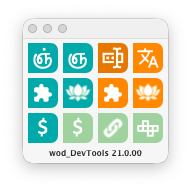
The wod_DevTools palette provides instant access to a suite of powerful utilities designed to supercharge your 4D development workflow.
Documentation Viewer and Magik Generation:
- ogToolsSuite – Widgets: Instant access to the complete markdown documentation for all ogToolsSuite component widgets.
- ogToolsSuite – Docs: Instant access to the detailed markdown documentation for all ogToolsSuite methods and classes.
- Magik Widgets: Automatically generate Magik code for the current host's widget definitions.
- Magik Docs: Automatically generate Magik code for the current host's methods and classes.
Code Management:
- Code Snippets: An integrated editor for creating and managing your reusable code snippets, featuring drag-and-drop insertion into your methods.
- Form Search: Quickly search and locate all instances of a specific subform or widget across your entire project.
- Methods Locals: Perform batch treatments and analysis on your methods and classes.
- Methods Relations: Visually map the call hierarchy between methods with detailed Callers and Callees reports.
- Local Names: Consultation of the spaces and naming convention for each.
Database Tools:
- Gnanam DB: A powerful quick-search explorer for your current database. Also available as a usable widget within your custom forms.
- Gnanam DBS: A multi-database management pane that allows for seamless exploration and drag-and-drop copying between databases.
System Access:
- Quick Access: Provides one-click shortcuts to all critical project folders (e.g., Project, Methods, Data, Resources).
Version 2.5.00 – Modernization & Enhanced till 20 R10 (still compiled in R3)
New Features:
- Extended 4D Class Support: Added 4D classes up to v20 R10 (
4D.HTTPAgent–c4HA, 4D.OutgoingMessage–c4OM, 4D.TCPConnection–c4TC, 4D.TCPEvent–c4TE, 4D.TCPListener–c4TL, 4D.UDPEvent–c4UE, 4D.UDPSocket–c4US, 4D.Vector–c4Ve). - Flexible Class Prefixing: Constructor and Function names now support custom prefixes like
"shared","session","local"… - Modern Variable Declaration: Support for
Var name : type:=valuesyntax. TheDeclare!andUndeclare!actions are now fully compatible (they won't touch the declarations with affectation). - Form Search: The
FORM EDITcommand has been upgraded in 4D version v20 R8+ to accept an object as parameter. wod will put this parameter to_wod_FORM_EDITin the host – the method then check if the host is capable.
What's new in V2?
Declare! improvement
Improvement of class detection
- $cs_xxx, $cE_xxx, $cES_xxx trigger type cs, cE, cES even when "xxx" is not found.
- $cs_colors triggers if only one class contains "colors".
- $cE_CLIENTSxxx triggers with CLIENTSEntity if only one found (regex = "(?i)CLIENTS.*Entity")
- $cES_CLIENTSxxx trigger with CLIENTSSelection if only one found (regex = "(?i)CLIENTS.*Selection")
Improvement of #declare!
- In the body of the code, added a max local's items in one declaration (set to 6).
- Algo is 10 lines before current local, or last empty line encountered from.
- Option to put declarations at beginning. For blocks (methods, or each block's keywords in classes).
- Incremental system: declarations are added in already existing declarations of the same type if any, or create a new line added after last declaration of same type found, or after last declaration found.
Undeclare!
Tired of cumbersome method declarations?
Declutter your code instantly. This powerful tool analyzes your 4D methods to safely undeclare all unused local variables and arrays, leaving parameters untouched.
For precise control, you can also manually select specific variables to remove, or clear the entire declaration section. All changes are processed incrementally for optimal safety and control.
- Safely removes unused
Var - Leaves parameters in #DECLARE(
...) untouched. - Incremental processing for reliable results.
- Flexible options: Target unused variables, a manual selection, or all declarations.
Class Code Intelligence: Now with Encapsulated Members Support
Classes are built with encapsulated blocks—each with independent locals: "No Tag", "Declaration", "Constructor", "Function", and "Computed Attribute".
Now, our powerful catalog system detects these blocks and organizes them into a structured collection, just like magic!
What can you do with this?
Use all your favorite code actions seamlessly across class blocks:
- Declare! ➞ Ensure properly scoped variable declarations in any block.
- Rename! ➞ Refactor variable names safely within a specific block.
- Unused! ➞ Find and remove unused variables without affecting other blocks.
- MagikDoc ➞ Automatically generate documentation for classes, just like methods.
This brings the same powerful code tooling you love for methods into the world of 4D classes—with full respect for encapsulation and scope.
Gnânam DB Explorer: Universal Database Navigation
Powerful Exploration, Effortless Management

The Gnanam DB Explorer is a unified interface designed to give you complete mastery over your database structures. Its goal is to allow you to seamlessly search, visualize, analyze, and transfer any item between databases through intuitive drag-and-drop operations.
Two Powerful Modes:
- Integrated Explorer:
- Access Gnânam—a powerful new widget and explorer—directly within your current host project.
- Quickly search and navigate your entire database structure without leaving your development environment.
- Multi-Database Workbench:
- Open a dedicated form that can host multiple independent explorers for any number of databases.
- Compare structures, analyze differences, and effortlessly drag & drop elements between them with unparalleled ease.
Key Features:
- Deep Integration: Embeds directly as a widget in your host project or operates as a standalone workbench.
- Advanced Search: Instantly find any table, field, method, form, or other project element.
- Visual Analysis: See your database structure clearly and understand relationships at a glance.
- Cross-Database Operations: Simplify workflows like copying tables, forms, or methods between projects with simple drag-and-drop.
Streamline your development and database management workflow with the power of Gnanam.
Gnânam DB Explorer
Showing four connected databases with full drag-and-drop support for all elements.

wod_DevTools: Code Mastery Suite

1. Methods Locals: The Code Health Dashboard
Gain instant visibility into your codebase. Methods Locals analyzes and filters your methods based on key quality metrics:
- Undeclared (Variables used but not declared)
- Unused (Variables declared but never used)
- Unnamed (Temporary or poorly named variables)
This module provides such a clear diagnostic of your code's health that once you start using it, it becomes an indispensable part of your development workflow.
Powerful bulk operations for a cleaner codebase.
Apply Declare!, Rename!, and Unused! actions to a selection of methods.
Accessible directly from the method list, with filters for Undeclared, Unused, and Unnamed variables.

2. Declare & Rename!: Intelligent Refactoring
Automate and standardize your code with powerful naming conventions. Declare & Rename! uses configurable naming spaces to bring consistency and clarity to your methods.
- Automatic Declaration: Generate properly declared variables instantly based on their usage in your code.
- Intelligent Renaming: Rename variables based on their inferred type, ensuring names always reflect their purpose.
- Batch Conversion: Instantly convert all variables across a selection of methods from one naming convention to another. A truly mind-blowing time-saver for large-scale refactoring.
3. MagikDoc: Instant, Living Documentation
Generate comprehensive, elegant documentation in Markdown format—directly from your code.
- Component-Focused: Perfect for documenting components, with automatic capture of calls, parameters (including aliases and types), and return values.
- Fully Customizable: Use and modify different tags to create a documentation standard that fits your needs.
- Integrated Viewer: A dedicated "Component’s Documentation Viewer" (powered by 4DPop) scans your components for
.mdfiles and presents them in a unified interface. View any method's documentation with a single click.
Create the skeleton for the documentation of your components and host databases in a few clicks.

4. MagikActions: Automated Code Transformation
Execute complex code transformations with a single click. This curated set of predefined actions handles tedious tasks automatically:
- Convert legacy
C_XXX()declarations to modernvarsyntax. - Automatically generate
#DECLAREstatements from assignments like$vLocal:=$nor$0:=$vAnswer. - And many more time-saving operations.
Flexible Execution: Run these actions on a single method or batch-process your entire project.
An overview of actions available for bulk method's selection, or on macro menu.

Form Analysis & Widget Locator

Tired of spending restless nights searching for component widgets across countless forms? This interface is your solution.
It quickly scans your entire project to find every occurrence of a subform's base name, making it incredibly easy to locate and manage all instances of your custom widgets and components.
Key Benefits:
- Eliminate Manual Searching: No more opening forms one by one to find where a widget is used.
- Streamline Component Development: Rapidly track down all uses of your custom subforms and widgets.
- Gain Project-Wide Visibility: Get a complete overview of where your UI components are deployed.
Spend less time searching and more time building.
Miscellaneous: Your Quick-Access Toolbox

A curated collection of essential utilities designed to streamline your daily workflow. This module provides instant access to common actions, saving you time and clicks.
Quickly and easily:
-
View and manage files and folders directly within your 4D environment.
-
Open documentation and critical project resources with a single click.
-
Access a suite of other handy tools designed for developer efficiency.
Spend less time navigating your system, and more time writing code.
Code Snippets
Dynamic snippets library.

ogToolsSuite documentation
Components markdown viewer – methods and classes.

ogToolsSuite Widgets
Widgets markdown viewer – default properties.
