
Your button chaos, resolved in one sacred syllable.
- Mantra: "Design once, deploy everywhere, learn instantly."
- Tagline: "Sēmippān: The masterclass in 4D asset management."
This HDI works from 4D v20 R10 (for 4DPop dependency) – included ogToolsSuite lifetime license for Sēmippān.
Github: protee/semippan.4dbase
Master with Sēmippān
Sēmippān is the advanced HDI and a sophisticated, real-world product. It is a powerful asset management system that is deeply integrated into the daily workflow at Protée, demonstrating the full, complex potential of zen_Nucleus in a serious production environment.
Sēmippān is more than a tool—it's a comprehensive How-Do-I (HDI) guide for implementing professional asset management in 4D.
- See Best Practices in Action: Explore a real-world, production-ready system for managing complex media libraries and multi-state buttons.
- Learn by Example: Understand how to create a centralized asset repository and deploy updates globally by studying a fully functional application.
- Full Source Code Included: The complete source code is provided. Tear it apart, see how it works, and adapt its powerful logic for your own projects.
Don't just manage your assets—master the architecture behind them.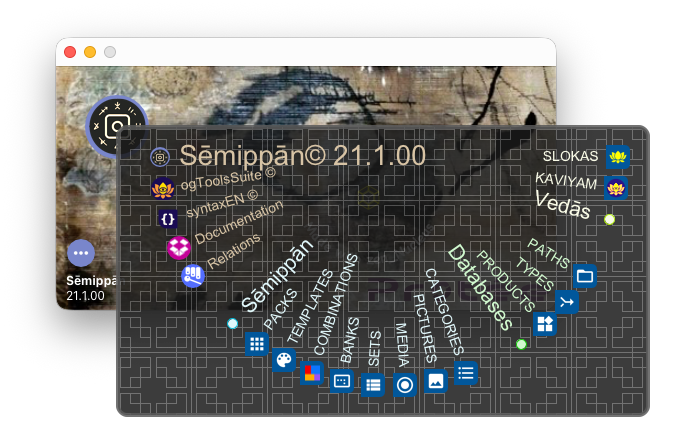
Tired of managing duplicate icons across countless projects? Sēmippān is your ultimate solution for centralized UI asset management.
Create & Test with Unprecedented Speed:
- Design generic button sets for all your products and specific buttons for individual databases.
- Prepare different projects and test your designs in a snap.
A Unified Repository for All Your Media:
- Store all picts, icons, and images in one single, organized place.
- Create and manage “4-state” button banks (normal, hover, pressed, disabled) in native 4D format.
- Update all your 4D databases with new assets in a single click, ensuring absolute consistency across all your products.
Out of the Box, Ready to Use:
- Provided pre-loaded with Google's Material Design icons.
- Fully integrated with woc_Colours for perfect palette consistency across all your assets.
A Showcase of Elegant UI Management:
Sēmippān also demonstrates how zen_Nucleus gracefully handles complex UI exceptions and behaviors in a non-blocking, elegant manner. See firsthand how to build interfaces that remain responsive and intuitive, no matter the complexity of the underlying operations.
Sēmippān doesn't just store your images; it orchestrates your entire design ecosystem, from creation to deployment.
Localised in EN, FR, ES. Dependencies: wok_Krolific – Licensing, Simplified, wox_Xlibrary – The Silent Engine, woc_Colours – Colours, Reloaded, waz_Wazar – UI, Unified, wob_Boxes – The Universal Container, wor_Recursive – The Infinite, Tamed, wos_SvgWidgets – Draw your verses, wqr_QuickReport – A 4D legacy fork, zen_Nucleus – The Final Verse.
The DCOXolver System: Precision Engine for Four-State UI Elements
Sēmippān standardizes UI behavior with DCOXolver, the intelligent color solver that algorithmically calculates perfect Default, Click, Over, and Disabled (DCOX) states for any UI element:
D- Default: The element's standard, at-rest state.C- Click: The state during active press or selection.O- Over: The state on mouse hover or focus.X- Disabled: The inactive, non-interactive state.

This system is powered by the advanced color management of woc_Colours. The dedicated widgets provide granular control over the palette for any element, allowing you to define:
- A Master Color: The foundational color value.
- State-Specific Colors: Four independent colors for each DCOX state.
- Bypass Colors: Exception values that override the standard rules.
- Mathematical Operations: Precisely calculate derived colors using addition and subtraction of values from indexed color spaces, ensuring perfect harmony and contrast across all states.
The entire architecture of TEMPLATES, SETS, and MEDIA is built upon this robust, mathematically precise DCOX foundation, enabling unparalleled consistency and control across all your UI assets.
Sēmippān: Architecture Overview
Structure

Modules
Sēmippān's power is built on a robust and modular database architecture, seamlessly managed by zen_Nucleus and ogToolsSuite. Here’s how the system is organized:
Module: Databases
This module defines the core structure of your product ecosystem.
[TYPES]: A recursive qualifier table, elegantly and automatically managed by wor_Recursive through zen_Nucleus, for hierarchical categorization.[PRODUCTS]: The master list of all your 4D databases and their respective folder paths.[PATHS]: Creates a powerful many-to-many relationship betweenPRODUCTS↔PACKS. Defines a sub-path (e.g.,/RESOURCES/) and can also specify an external path for corporate-wide output distribution.
Module: Sēmippān
The engine of the asset management system.
[PACKS]: A group ofBANKS, assigned to one or morePRODUCTSvia thePATHStable.[TEMPLATES]: This table stores master DCOXolver configurations. These templates are global or linked to BANKS, and used in SETS, and MEDIA, and can be individually overloaded by a local DCOXolver definition for precise, granular control at any level.[BANKS]: The central kernel. A Bank entity is associated with multipleSETS(which define output parameters like icon type, size, and colors) and multipleMEDIA(the assets to be exported).[SETS]: Defines a complete set of parameters for how to process and exportMEDIAfor aBANK.[MEDIA]: Contains specific overloads forSETSvariations and a link to the actual picture files in thePICTUREStable.
Module: Pictures
The centralized repository for all visual assets.
[PICTURES]: Stores all pictures to be used forMEDIA, categorizable by types for colors, and stroke, and a category.[CATEGORIES]: Provides categorization for thePICTUREStable.
Module: Vedās
The advanced module for corporate-level exports and animations.
[KAVYAM]: A table for managing animation sequences or complex drawings across a set ofPRODUCTS. Essential for sophisticated ogToolsSuite corporate exports.[KAV_PRO]: A many-to-many association table linkingKAVYAM↔PRODUCTS.
This structured yet flexible architecture is what allows Sēmippān to scale from a single database to managing the consistent branding of an entire corporate suite of products with a single click.
Complex UI user cases (with zen_Nucleus)
User case 1: zen_sublist (BANKS) → zen_c4ES (SETS) AND zen_sublist (MEDIA).

User case 2: linked zen_sublist (SETS) → zen_sublist (MEDIA), and SETS entity editor.

Form: sēmippāṉ (சேமிப்பான்) – Tamizh
Verb Root: sēmi (சேமி) - to save, to conserve
Translation: "The one who saves, conserves, the protector"